Ask most marketers why birthday emails work so well and you will get the same answer every time. People like being celebrated. That is true. But it does not explain why the exact same discount converts so much worse on a random Tuesday than it does on someone’s birthday.
Birthday Email Automation is one of the highest converting flows an ecommerce store can run. Understanding why it works makes the difference between a flow that quietly performs and one that just sits there looking nice. This article breaks down the real reason behind the numbers. Then it walks through exactly how to set it up on Shopify or WooCommerce.
What Is Birthday Email Automation?
Birthday email is a system. It automatically sends a personalized email, usually with a discount or gift, to a customer around their birthday. It runs off a stored birthdate, not a manual calendar reminder. That means the automatic birthday email goes out every single year. No one on your team has to remember it.
At a basic level, it needs three things:
- A birthdate, which you collect once through a signup form, popup, or account page
- A trigger, which you usually set a few days before the birthday
- An offer, like a discount code, free shipping, or a small gift
Most people searching for this are really asking one of two things. Either why do these emails perform so well, or how do I actually build one. This article answers both.
Why Does Birthday Automation Convert So Well?
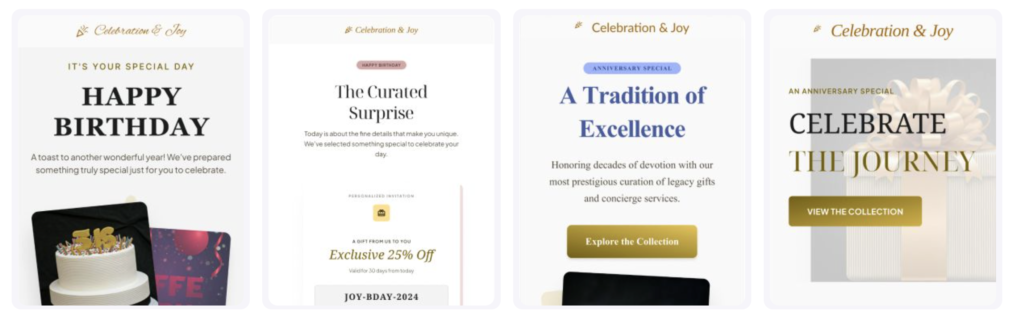
Here is what is actually happening. A birthday puts someone in a slightly different mental state than usual. They feel a bit more sentimental and a bit more open. They think about themselves in a positive light, instead of scrolling past another promotional email without reading it. Their normal resistance to sales pitches drops, just for a day or two.
For a marketer, that is the real opportunity. A birthday discount email does not compete with every other sale email in the inbox the way a normal campaign does. It does not read like a sale. It reads like something personal.
The Data Behind Why Birthday Email Works
The numbers back this up clearly. Studies from Experian found that birthday emails generate roughly 481% higher transaction rates than standard promotional sends. Revenue per email runs 342% higher, and unique click rates come in 179% higher. Separate data from Omnisend shows birthday email open rates averaging around 45%. Compare that to a typical email conversion rate of about 0.07%, against 0.72% for birthday emails specifically. This is exactly why birthday email marketing consistently outperforms generic promotional campaigns.
Those numbers are not small. They only show up when an email lands in a genuinely different emotional context than everything else competing for that same inbox.
How Does it Work?
Once you understand why it converts, the mechanics are simple.
The Setup Steps
Step 1: Collect the birthdate. A signup form field, an account page, or a short post-purchase popup all work. Keep it optional. Offer a small incentive for sharing it if you want stronger data capture.
Step 2: Set the trigger a few days early. Sending 3 to 7 days before the birthday gives customers time to shop. The email should never arrive after the moment has already passed.
Step 3: Keep the sequence short. Two to three emails usually works best. Send one heads up before the birthday, one on the day itself, and an optional reminder a few days later if the birthday discount code has not been used yet.
Step 4: Attach a simple offer. A percentage discount, free shipping, or a small free gift all work well. Just keep the offer easy to understand at a glance.
Step 5: Add a real deadline. An offer with no expiration date rarely gets used. Even a 7 to 10 day window creates enough urgency to noticeably lift redemption.
Why a Generic Birthday Wishes Email Often Backfires
Here is the part almost nobody covers. That same emotional openness cuts both ways.
When a customer is a little more attentive than usual, they notice more too. Customers do not just ignore a lazy or generic birthday wishes email the way they would on a normal day. It actually reads as a small letdown. Picture a copy-pasted “Happy Birthday, here’s a code” template with zero thought behind it. It feels like an obvious afterthought, right when the customer was paying closer attention than usual.
This is really the reason so many birthday campaigns underperform their real potential. It is not a broken automation. It is a technically correct automation carrying a thoughtless message. And it lands at the one moment a customer noticed more than usual.
Setting Up Birthday Automation on Shopify
Shopify does not include a birthday field by default, which is usually where store owners stall out. Add a birthdate field to your signup form or a short popup. Then connect that data through Adflipr’s Shopify integration, so the trigger fires automatically without anyone checking a calendar.
Shopify Example
A skincare brand might send a 20% off birthday discount email five days before the customer’s birthday. It can include a product recommendation pulled from their last order instead of a generic banner. Same automation as everyone else, noticeably better result because of one small personalization step.
Setting Up Birthday Automation on WooCommerce
WooCommerce has no native date-based trigger, so a birthdate collected through a checkout or account field goes nowhere on its own. Connecting it to Adflipr’s WooCommerce email marketing integration turns that stored field into a working automated birthday email flow.
WooCommerce Example
A home goods store might pair this with a free shipping offer and a 10 day expiry. That gives a lapsed customer a real reason to act this week, instead of shelving the email for later.
Real Examples and Revenue Numbers
A well-run ecommerce birthday campaign generates predictable, repeatable revenue without ongoing manual work. A store with 5,000 subscribers, where 10% share a birthday and the flow converts at a modest 8%, generates roughly 40 extra orders a month. It runs entirely on autopilot. That is the baseline result most stores see with a simple setup.
A flow that also references past purchase data tends to push redemption even higher. The birthday offer email does more than just show up on time. It shows the customer that the brand actually knows them.
Best Practices for Email Automation
- Send it a few days early, not on the day itself, so customers have time to actually shop
- Keep the offer simple, one clear discount or gift beats a complicated one with conditions attached
- Add a real deadline, since an offer with no expiration rarely gets acted on
- Personalize beyond the name, referencing a past order takes little effort and changes how the email lands
- Make redemption one click, auto-apply the code instead of asking customers to copy and paste it
- Segment by customer value, a first-time buyer and a loyal repeat customer do not need the same offer
Common Mistakes to Avoid
- Collecting birthdays and never connecting the data to a trigger, which happens more often than people think
- Sending the email too late, after the birthday has already passed
- Treating it as a one-time send instead of a flow that runs every year automatically
- Copy-pasting a generic template without any personalization, which reads worse on a birthday than it would any other day
- Forgetting to track redemption rates, so you never know if the flow actually needs improvement
How Adflipr Helps You Run This Without the Guesswork
Adflipr focuses specifically on Shopify and WooCommerce stores. That means it works as a core feature, not an afterthought bolted onto a generic email tool.
With Adflipr, you can:
- Sync customer birthday data directly from Shopify or WooCommerce, so you never collect the data and then forget about it
- Build the actual trigger and timing for the sequence, the days-before email, the on-the-day email, the follow-up, using Adflipr’s automation workflows, then design each individual email inside that sequence with the email builder, no developer needed for either step
- Pull past order details straight into the email using dynamic product blocks, so the personalization step from earlier in this article is actually realistic to build
- Run birthday automation alongside other pre-built automation workflows, like abandoned cart recovery, using the same customer and order data
- Pay based on active contacts rather than your full list size, which keeps the cost predictable as your subscriber base grows
Conclusion
Birthday email automation converts well because it lands during a genuinely different emotional moment than every other email competing for attention. That same moment also explains why a thoughtless, copy-pasted version underperforms its real potential. A small amount of effort pays off here more than almost anywhere else in your email calendar. Reference a past order, add a real deadline, and keep the offer simple.
If you already collect birthdays but nothing happens with that data afterward, that is the gap worth closing first. Close it before adding anything more advanced to your retention strategy.