
Change Contact Status is a workflow action of adflipr that automatically updates a contact’s subscription or engagement status when they reach a specific step in your automation.
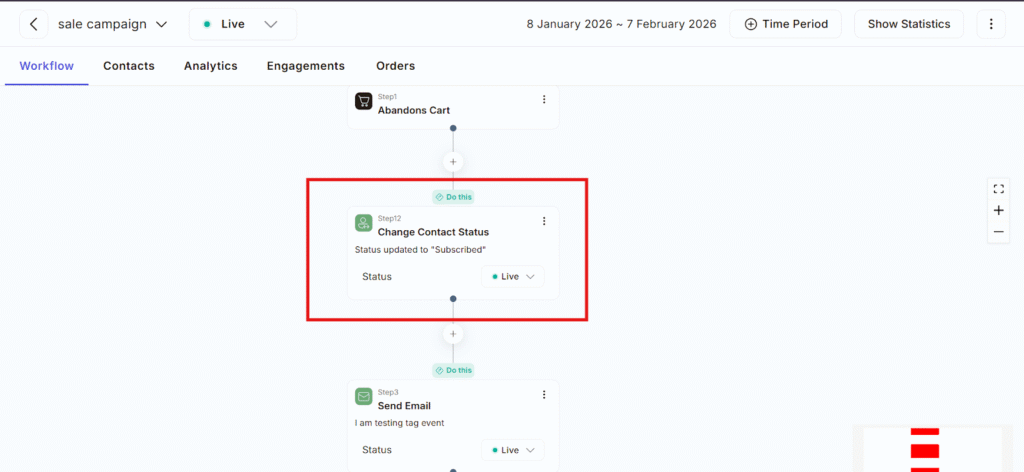
This feature exists as Contacts don’t always stay in the same state for long duration Someone can be Unsubscribed, Inactive and many more. This feature helps you keep contact records accurate and up to date without manual work.
Step-by-Step: How the “Change Contact Status” Action Works:
- Contact enters the workflow automation
- Adflipr reaches the “Change Contact Status” step
- You select a status from the dropdown menu
- Adflipr updates the contact profile instantly
- All next steps follow as per the new status
Available Contact Status in Adflipr are:
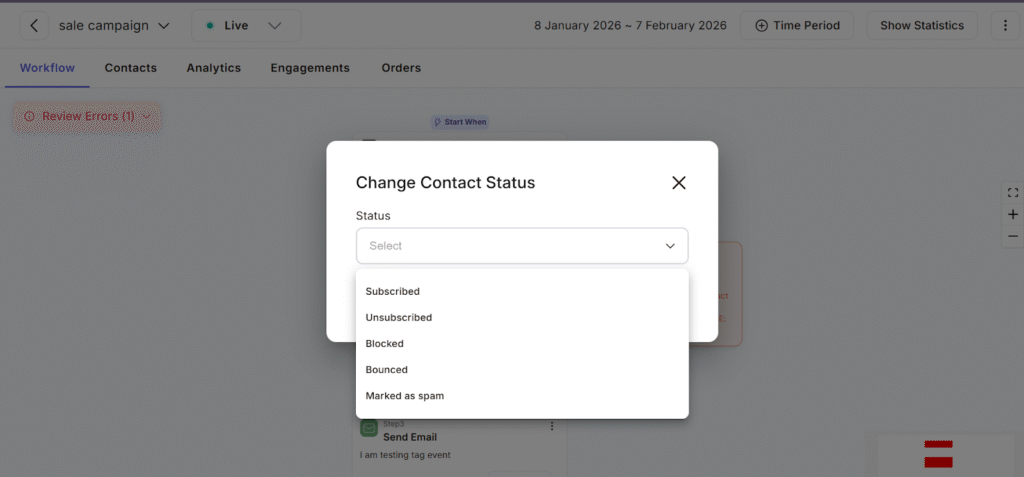
- Subscribed- The contact is active and allowed to receive emails.This means they are eligible to receive marketing emails, They can be included in campaigns and they are treated as an active contact.
- Unsubscribed– The contact does not want to receive marketing emails. this. This means blocks all promotional emails and keeps the contact in your database.
- Blocked– The contact is fully restricted from all communications this means it stops all emails (marketing + workflow) also prevents the contact from entering new workflows and protects your sender reputation.
- Bounced- Emails sent to this address failed to deliver. This means Automatically stops future sends Flags the email as invalid and helps in maintaining email deliverability.
- Marked as Spam– The contact reported your email as spam. This means Immediately blocks all future emails, Protects your domain reputation and Records the action for compliance
Why this feature is important in Adflipr
– Ensures email delivery – Adflipr will not send campaign emails to contacts who are not subscribed. This step guarantees the email action works.
– Keeps contact data clean- Instead of outdated or incorrect statuses, Adflipr always reflects the contact’s current engagement level.
– Enables smart automation- Re-subscribe returning users, Activate leads after form submissions and Move users between campaigns dynamically.
In Adflipr, Change Contact Status is your control switch:
- Who gets emails
- Who doesn’t
- Who should be protected or blocked
Using it correctly ensures:
– Better deliverability
– Compliance
– Smooth automation
