
The Jump Step in Adflipr Automation is a special action that allows you to instantly move a contact from their current position in a workflow to another specific step in the same automation. Instead of letting the contact continue through the remaining steps in order, the Jump Step redirects them immediately to a different step that you choose.
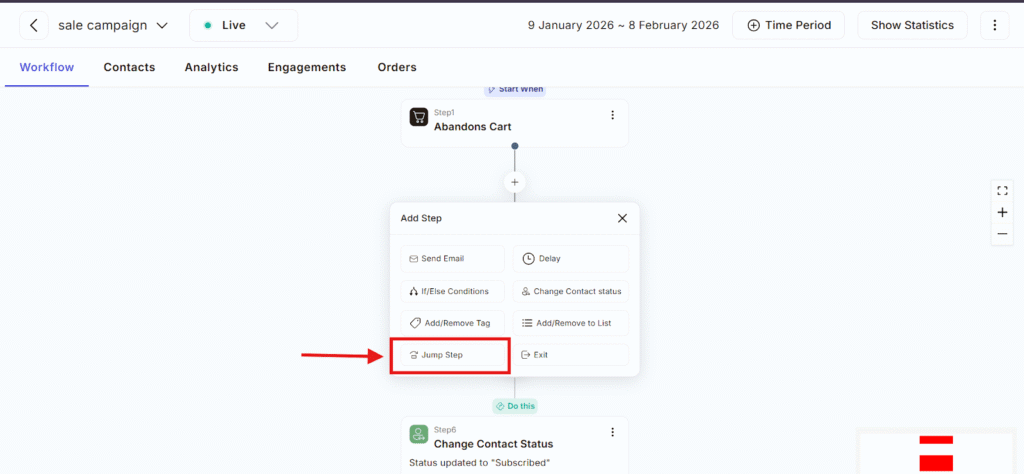
Generally , automation runs step by step but real customer behavior isn’t always linear.
The Jump Step allows Adflipr to react smartly when something important happens.
For example:
- A user completes a purchase
- A contact meets a specific condition
- You want to skip unnecessary steps
Instead of waiting, Adflipr jumps the contact directly to the right place.
When the Jump Step is triggered:
- Adflipr stops the current flow for that contact
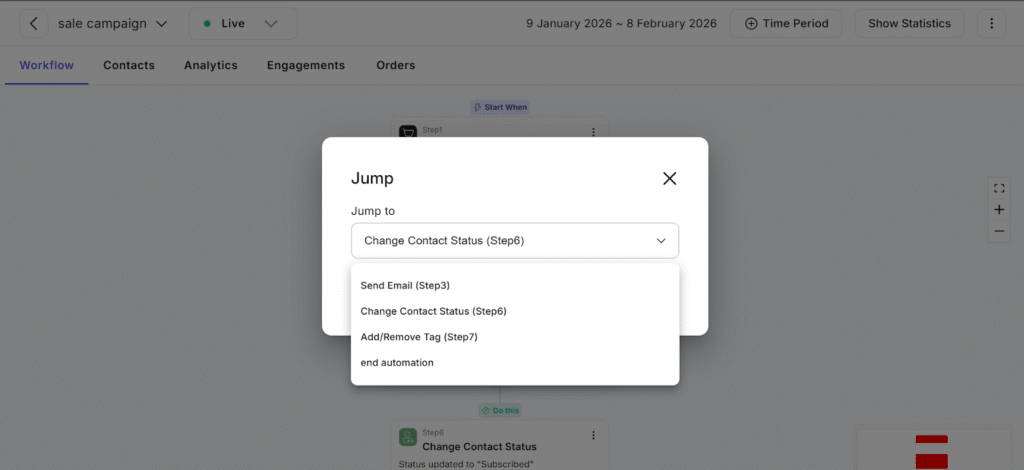
- It moves the contact immediately to a selected step
- Drop down menu occur select the step you want to skip
- Click to submit tab
- The contact continues from that new step
- All skipped steps are ignored
Use Jump Step when you want to:
- Skip unnecessary steps
- React immediately to user actions
- Redirect contacts to a new flow
- Keep automation smart and clean
When NOT to Use Jump Step
- Without clear logic
- If it creates confusion in the workflow
- When a simple If/Else condition is enough
Some Common Cases of Jump:
- when purchase is Completed – Jump to the “Order Completed” step and you can Skip follow-ups.
- Condition Met – If a user Clicks a link, Opens an email and Meets a tag condition in such condition Jump is a relevant action.
- Clean Automation Flow – Use Jump Step to Avoid loops
The Jump Step in Adflipr automation is used to redirect contacts instantly to the most relevant step based on their actions or conditions, ensuring they receive the right message at the right time without unnecessary steps.
