
The Email Audit feature in Adflipr helps you check your email before sending it to make sure everything works correctly, loads fast, and follows email compliance rules. It reduces errors that can hurt your campaign performance or user trust. Think of it as a final quality check for your email.
Instead of manually checking links, compliance elements, and technical limits, Adflipr automatically scans your email and highlights potential problems that could negatively impact deliverability, user trust, engagement, or legal compliance.
This feature acts as a safety between email creation and sending, helping marketers, teams, and businesses send no error email with full of confidence.

Major objective of this feature is :
- Prevent missing links
- Ensure legal compliance with email regulations
- Improve email load speed
- Reduce spam complaints and unsubscribes
- Protect brand reputation
- Increase conversion and click- rates
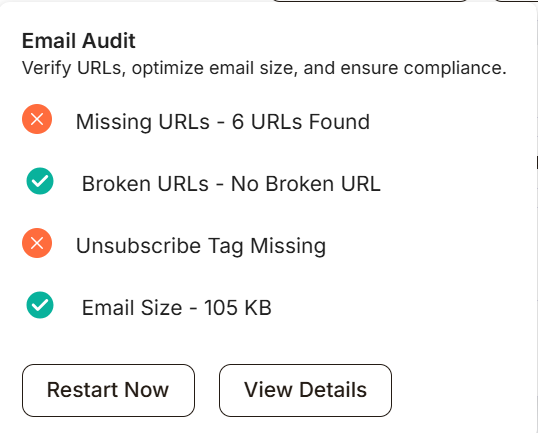
1.Missing URLs – This means some text, buttons, or images in your email look clickable, but no link (URL) is attached to them.
- A button like “Shop Now” → but clicking it does nothing
- Text like “Click here” → but no actual link behind it
Why is this a problem?
❌ Users click but nothing happens → bad experience for customers
❌ Email providers may treat it as poor-quality or spam
❌ Click tracking will fail → wrong campaign analytics
❌ CTA (Call-to-Action) becomes useless
You can fix this problem by following these steps
Step-1 : Click View Details
Step-2 : Adflipr will highlight all 6 missing URL elements
Step-3 : Add a valid link to:
– Buttons
– Link
Step -4: Re-run the Email Audit
Once fixed, this error will turn green.
2.Broken URLs – Adflipr tests every URL in your email to ensure that it loads correctly, it really exists and does not return errors.
– Broken links are important as they reduce waste clicks and signal poor quality to subscribers. They can also hurt brand credibility, campaign ROI and user confidence
– Even one broken link in a high-traffic campaign can mean:
- Loss in revenue
- Miss of sign-ups
- Poor campaign performance reports
3. Unsubscribe Tags – Adfipr verifies that your email includes visible unsubscribe option, valid unsubscribe tag or link and proper placement for compliance.
Unsubscribe links are legally required by regulations such as for spam, unwanted email and frequently occurring.
Without them, emails may be:
- Marked as spam
- Blocked by email providers
- Flagged for policy violation
Missing unsubscribe tags can result in account suspension, reduced deliverability and Legal penalties.
4. Email Size– Adflipr measures the total size of your email, this includes HTML code,Images, Inline styles and embedded content.
It is important as large emails can load slowly on mobile devices, May be clipped in Gmail and can increase bounce rates while in small email size it can load fast, improve open rates and click rates.
Email size is critical most clients have limits:
- Emails above -102 KB may get clipped
- “View entire message” appears
- Important content, CTAs, or tracking pixels may be hidden
For Example -An email with multiple large images that causes Gmail to cut off content.
View details
View Details opens a detailed, actionable report of the Email Audit. It shows Which elements have missing URLs, Where they are in your email, What needs to be fixed.
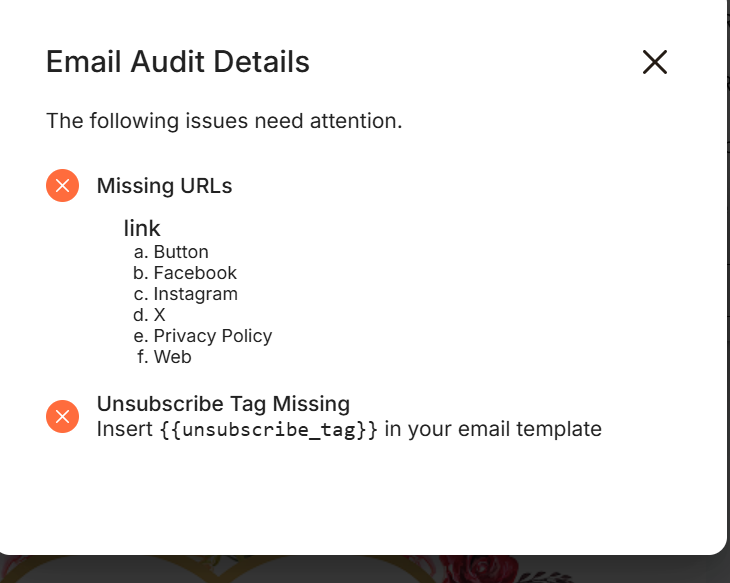
Features you can see inside View Details – Depending on the issue, Adflipr may show:
Missing URLs
- List of buttons, images, or text blocks
- Highlighted elements inside the editor
- Type of element (button / image / text)
- Warning like: “Clickable element without link”
Email Size
- Current email size (e.g. 105 KB)
- Size threshold warning
- Suggestions to reduce size
Unsubscribe Tag
- Clear message if tag is missing
- Location suggestion
