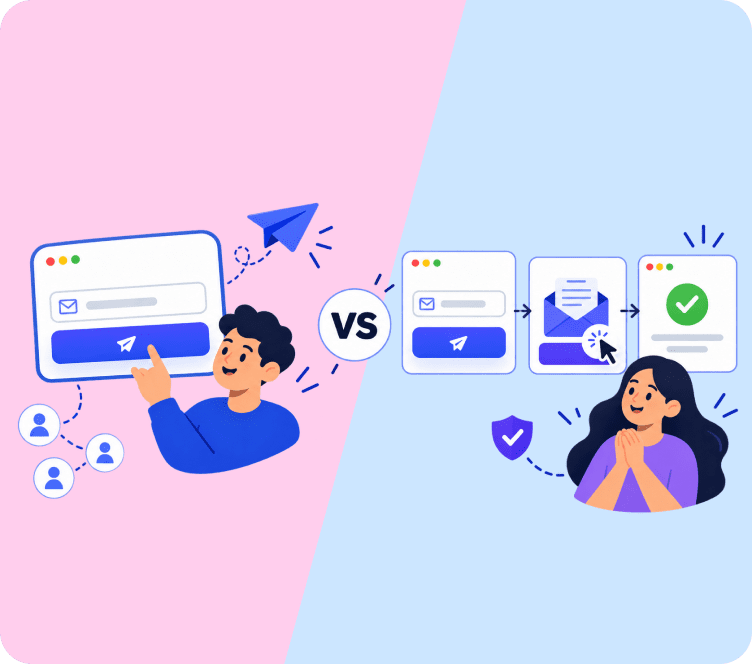
Choosing between single opt-in and double opt-in is one of those decisions that looks small but shapes everything downstream: how fast your list grows, how clean it stays, whether your emails land in the inbox, and whether you are compliant with laws like GDPR and CASL. This guide breaks down both methods clearly so you can pick the one that fits your goals.
Quick Answer: Single opt-in adds subscribers immediately after they fill out your form. Double opt-in requires them to confirm via a link in a follow-up email. Single opt-in grows your list faster. Double opt-in builds a more engaged, higher-quality list. Neither is universally better: the right choice depends on your goals, your audience, and where your subscribers are located.
What Is Single Opt-In?
Single opt-in (SOI) is a one-step email signup process. A person enters their email address in your form, clicks submit, and they are added to your list. That is it. No confirmation email, no extra click required.
This is the most common method for growing an email marketing list quickly, though it puts more pressure on subscriber list quality since every entry goes through untouched. Because there are fewer steps, more people who start the signup process actually end up on your list.
How single opt-in works
- Visitor fills out your signup form
- They click submit
- They are added to your list right away
- They may receive a welcome email
The process is fast and frictionless. For the subscriber, it feels effortless. For you as the sender, the list grows faster, but you also take on a bit more risk around list quality.
What Is Double Opt-In?
Double opt-in (DOI), also called confirmed opt-in, is a two-step email signup process. After someone submits your signup form, they receive a confirmation email. They must click the link inside that email to be officially added to your list.
If they do not click the link, they are not added as a subscriber.
This extra step slows down list growth, but it filters out fake emails, typos, and people who are not truly interested in hearing from you.
How double opt-in works
- Visitor fills out your signup form
- They receive a confirmation email with a verification link
- They click the link to confirm their subscription
- They are added to your list
- They may receive a welcome email
The confirmed opt-in process is a bit more work for both you and your subscriber. But it produces a cleaner, more engaged email list.
Single Opt-In vs Double Opt-In: Side-by-Side Comparison
| Factor | Single Opt-In | Double Opt-In |
|---|---|---|
| Steps to subscribe | 1 | 2 |
| List growth speed | Faster | Slower |
| List quality | Lower (more noise) | Higher (verified emails) |
| Spam complaints | Higher risk | Lower risk |
| Email deliverability | Needs more monitoring | Generally stronger |
| GDPR compliance | Requires care | Stronger by default |
| Engagement rates | Lower per subscriber | Higher per subscriber |
| Bounce rate | Higher | Lower |
| Best for | Fast growth campaigns, events | Long-term list quality, regulated markets |
Pros and Cons of Single Opt-In
- Faster list growth. Fewer steps mean more people complete the process. You lose fewer subscribers to a missed confirmation email.
- Less friction. Subscribers can start receiving your emails right away, without having to check their inbox for a confirmation.
- Good for in-person signups. If someone gives you their card at a trade show or signs up at checkout, a single opt-in makes sense because the context is already clear.
- More total opens and clicks. A larger list means more opportunities for engagement, even if the rate per subscriber is lower.
- More fake or mistyped emails. Without a confirmation step, anyone can type any email address into your form. Bots and bad actors can inflate your list with junk contacts.
- Higher bounce rates. More invalid addresses lead to more hard bounces, which can hurt your sender reputation over time.
- More spam complaints. Someone who forgot they signed up or was added without real intent is more likely to mark your email as spam. Learn what else causes this in our guide on why emails go to spam.
- Needs more ongoing maintenance. To keep a single opt-in email list healthy, you need dedicated contact management to clean it regularly and monitor deliverability closely.
Pros and Cons of Double Opt-In
- Better list quality. Every person on your list has confirmed their email address and actively chosen to subscribe. That is a meaningful filter.
- Lower bounce rates. Confirmed emails are real and working, which keeps your hard bounce rate low.
- Fewer spam complaints. Subscribers who completed two steps are genuinely interested. They are far less likely to report your emails as spam.
- Stronger for email deliverability. A clean, engaged list signals to inbox providers like Gmail and Yahoo that your emails are wanted. This helps your emails land in the inbox rather than the spam folder. You can learn more about this in our email deliverability guide.
- Easier GDPR compliance. In markets where you need to prove explicit consent, a confirmed opt-in creates a clear record of when and how the subscriber agreed.
- Slower list growth. Some people who intended to subscribe will not complete the confirmation step, either because they missed the email or lost interest.
- Confirmation emails can go to spam. If your sender reputation is not strong, the confirmation email itself might not reach the inbox, which means real subscribers could fall through the cracks.
- More setup involved. You need to configure and test your confirmation email, your post-signup page, and your follow-up messaging.
Does Single Opt-In vs Double Opt-In Affect Email Deliverability?
Yes, your choice of opt-in method has a direct impact on email deliverability.
With single opt-in, your list will include more unverified addresses. Invalid emails produce hard bounces. Too many hard bounces lower your email sender reputation, which makes inbox providers less likely to deliver your future emails to the inbox.
With double opt-in, you are only emailing people who confirmed their address and their intent. This produces lower bounce rates, fewer spam complaints, and better engagement signals overall. All of these things help your emails reach the inbox more consistently.
If you use single opt-in, you need to be more proactive. Monitor your bounce rates, remove inactive subscribers regularly using your contact management system, and keep an eye on your spam complaint rate. If it rises above 0.3% (the current threshold Google and Yahoo use), your deliverability will take a hit.
GDPR, CASL, and Legal Considerations
This is one of the most important factors that many guides gloss over.
If your subscribers are based in the European Union or the UK, GDPR (General Data Protection Regulation) applies. Under GDPR, you must be able to prove that each subscriber gave genuine, informed consent to receive your emails, and that consent must be just as easy to withdraw as it was to give. While GDPR does not specifically require double opt-in by name, the confirmed opt-in process is the most reliable way to meet that standard. It creates a clear record: this person signed up, they received a confirmation, and they clicked to confirm.
With single opt-in, your consent record is thinner. If a subscriber complains or regulators come asking, it is harder to prove that consent was genuine.
CASL (Canada’s Anti-Spam Legislation) is similar. It requires express or implied consent, and again, confirmed opt-in gives you the cleaner paper trail.
If you are sending to subscribers in the EU, UK, or Canada, double opt-in is not just a good idea. It is close to a requirement in practice, even if the letter of the law gives you some flexibility.
For US-based lists under CAN-SPAM, there is more flexibility. But even then, a high-quality confirmed list reduces your risk of abuse complaints.
How to Choose Between Single Opt-In vs Double Opt-In
Here is a simple way to think about it.
Choose single opt-in if:
- Your primary goal is fast list growth
- Your subscribers are mostly in markets without strict consent laws (like the US)
- You are collecting emails at events, in-person, or at checkout with a clear opt-in statement visible
- You have systems in place to clean your list regularly and monitor deliverability
- You are comfortable handling a higher volume of bounce management
Choose double opt-in if:
- You want a higher-quality, more engaged email list
- Your subscribers are in the EU, UK, or Canada
- You are building a list for a long-term newsletter or community
- You have had deliverability problems in the past
- You want to reduce the time spent cleaning your list
Some businesses use both. They might use single opt-in for a specific campaign or event, and double opt-in as their default for their newsletter list. This can work well as long as you track each list separately so one does not drag down the other.
How to Make the Most of Each Method
Whichever method you choose, a few practices will help you get better results.
Getting more out of single opt-in
- Add a clear opt-in statement near your popup and signup forms so subscribers know what they are agreeing to
- Send a strong welcome email right after signup to confirm their interest while it is fresh
- Set up automated list cleaning with contact management to remove hard bounces and long-term inactive subscribers
- Watch your spam complaint rate closely. If it creeps above 0.1%, it is time to investigate
- Consider using email verification tools on your form to catch obvious typos before they hit your list
Getting more out of double opt-in
- Tell subscribers on the thank-you page that a confirmation email is coming, so they know to look for it
- Use a clear subject line in your confirmation email, something like: “Please confirm your subscription”
- Keep the confirmation email simple and on-brand. One clear button is all you need
- If someone has not confirmed after 24 to 48 hours, you can send one reminder
- Make sure your sender reputation is healthy with proper email deliverability settings so your confirmation emails actually reach the inbox
Good email list building practices matter regardless of which method you use. A clean list, clear consent, and consistent sending habits are what really drive long-term results.
What About Engagement Rates?
Double opt-in lists typically show higher open rates and click-through rates because the subscribers are more intentional. They took an extra step to confirm, which tells you something about their level of interest.
Single opt-in lists have lower per-subscriber engagement rates on average, but because the list is larger, total opens and clicks can still be higher in absolute numbers.
Neither approach is definitively better on engagement. It depends on how well you nurture the list after signup. An engaged welcome series, relevant email marketing segmentation, and consistent value are what keep subscribers opening your emails over time.
Key Takeaways
- Single opt-in adds subscribers immediately with no confirmation step. It grows your list faster but brings in more noise.
- Double opt-in requires subscribers to click a confirmation link. It is slower but produces a cleaner, more engaged list with fewer deliverability risks.
- Your choice directly affects email deliverability: more invalid emails from single opt-in mean more bounces and a weaker sender reputation.
- If your subscribers are in the EU, UK, or Canada, double opt-in is the safer and often more compliant choice under GDPR and CASL.
- You can use single opt-in for speed-focused campaigns and double opt-in as your standard for long-term list building.
- Either way, strong list hygiene, a clear consent statement, and a good welcome email make a bigger difference than the opt-in method alone.
Final Thoughts
The single opt-in vs double opt-in decision is not as complicated as it might seem. Both methods work. Both have their place. What matters is matching the method to your goals, your audience, and your legal obligations.
If you are just getting started with email list building, double opt-in is the safer default. It keeps your list clean, protects your deliverability, and gives you a stronger consent record. If you are running a time-sensitive campaign and have good list hygiene practices in place, single opt-in is a perfectly reasonable choice.
Adflipr makes it easy to set up either approach for your popup and signup forms and marketing automation workflows, so you can start building a list that actually converts.
Frequently Asked Questions
Single opt-in adds subscribers to your list immediately after form submission, while double opt-in requires them to click a verification link in a confirmation email first.
GDPR does not name double opt-in specifically, but it mandates clear, documented proof of consent. Confirmed opt-in is the most reliable way to prove compliance.
It can. Single opt-in allows invalid emails and typos onto your list, increasing bounce rates and spam complaints that gradually damage your sender reputation.
Yes. You can update your signup settings at any time. Existing subscribers remain active, while all new signups follow the updated confirmation process.
Single opt-in is legal in many markets including the US under CAN-SPAM. However, sending to subscribers in the EU, UK, or Canada requires strict consent documentation.