Most online stores spend their budget on new buyers, and then many of those buyers never order again. In a store, that loss is churn: a customer who stops buying. This guide shows how to reduce customer churn from the first order to the final win-back email, building on our customer retention email strategies.
Quick answer: To reduce customer churn, set a lapsed cutoff from your own orders. Then win the second order, remind buyers to reorder, ask lapsed customers why they left, run a three-email win-back and stop emailing contacts who stay silent.
What Customer Churn Means for an Online Store
Customer churn is when a buyer stops ordering. A store has no cancel button, so churn shows up as a long gap between orders. Our churn rate page covers the standard formula.
There are two kinds. Voluntary churn is a customer who decides to leave. Involuntary churn happens when a card fails on a subscription. Your payment or subscription app can retry the card and send the update link, so handle that there.
Why Customers Stop Buying
Most causes show up after the first order, not before it. These are the usual ones:
- An uncertain first order: they did not know when it would arrive or how to use it
- No follow-up: nothing brought them back after delivery
- Delivery, support or return problems: a late parcel or a slow reply
- Discount habits: they only buy during sales
- Generic emails: new buyers and loyal buyers get the same message
- A one-time need: a gift buyer may never need you again
Some churn is not fixable, such as the one-time gift. So focus on the causes you can change, and use Fix 6 to learn which ones matter in your store.
Before You Start: Set Your Lapsed Cutoff
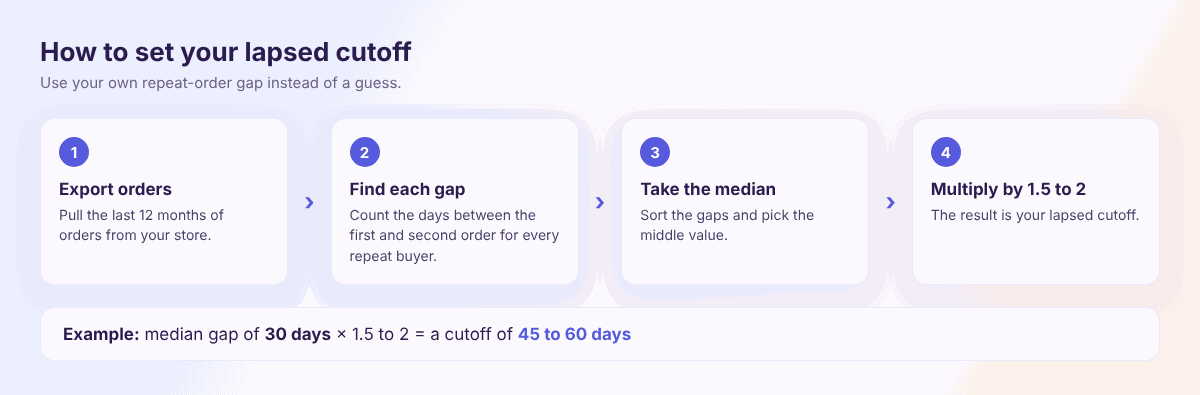
A customer is lapsed when they wait longer than your repeat buyers usually do. So start with your own orders instead of a guess.
- Export your orders from the last 12 months.
- Find the days between the first and second order for each repeat customer.
- Take the middle value, which is the median.
- Multiply it by 1.5 to 2 to get your cutoff.
For example, if the median gap is 30 days, your cutoff is 45 to 60 days. Shopify’s churn guide counts a customer as churned after twice the average repeat timeline. We suggest 1.5 to 2 times the median, so you can act a little earlier. Adjust the multiplier after your first test.
If you have too few repeat orders, use a starting point from this table. These are editorial guidance, so replace them with your own numbers when you can.
| What you sell | Starting cutoff |
|---|---|
| Things that run out, such as coffee or skincare | 60 days |
| Fashion and home items | 90 days |
| Gifts and higher-priced items | 120 to 180 days |
Next, save buyers who passed the cutoff as a group. Tags and segments in contact management make this easy, because Adflipr syncs customers, orders and purchase history from Shopify and WooCommerce.
How to Calculate Churn Without Subscriptions
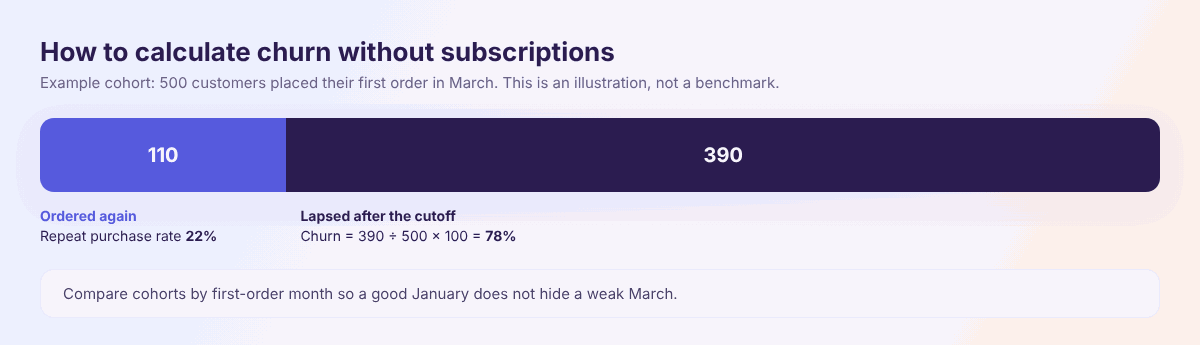
Pick a cohort, such as everyone whose first order was in March. Wait until your cutoff has passed, then count the customers who did not order again. Divide that number by the cohort size and multiply by 100.
For example, say 500 customers placed a first order in March and 110 ordered again within the cutoff. The other 390 are lapsed, so churn is 78%. The repeat purchase rate, which is repeat buyers divided by all buyers, is 22%. This is an illustration, not a benchmark.
Benchmarks vary a lot by category, so compare your own cohorts month to month instead.
Who to Save First
Customers rarely leave without warning, so watch for these signs. Our at-risk customer page explains them further.
- A longer gap between orders than usual
- Fewer email clicks
- A support complaint or a return
- A cart left behind more than once
- Buying only during big sales
Not every lapsed customer is worth the same effort. Start with your best buyers, who have the most orders or the highest spend, because they are the costliest to lose. Give them a personal note or early access instead of a discount. Treat sale-only buyers more carefully, since a discount may be the only thing they respond to.
Which Fix to Start With
Start where your store hurts most. Each fix is explained below, in this order.
| If this sounds like you | Start with |
|---|---|
| Most buyers order once | Fix 1: post-purchase emails |
| Your repeat rate is low | Fix 2: reward the second order |
| You sell things that get used up | Fix 3: reorder reminders |
| Every buyer gets the same emails | Fix 4: personalize by purchase |
| Reviews or replies mention delays | Fix 5: delivery, support and returns |
| You don’t know why people stop | Fix 6: ask why |
| You have a long list of old buyers | Fix 7: win-back series |
| Your open rates keep falling | Fix 8: stop emailing silent contacts |
8 Ways to Reduce Customer Churn
Fix 1: Make the First Order Go Well
Many buyers leave because the first order felt uncertain. They did not know when it would arrive, or how to use it.
So send a short series after the order: an order update, a how-to tip once the product arrives and a check-in. Then ask for a review 7 to 14 days after delivery, so the buyer has had time to use the product. Keep the tone helpful, and skip the second-purchase pitch in the first email.
Our post-purchase email sequence and review request email pages cover the timing in more detail.
Fix 2: Reward the Second Order
The second order turns a buyer into a regular. Give people a small reason to place it.
Low-cost ideas include early access to a new product, free shipping on the next order and a useful tip with your thank you note. Try early access before a discount, because discounts cut your margin and some customers learn to wait for them.
If you run a loyalty program, use email to remind customers of their points, because unused points do not change behavior. Our loyalty program page explains why.
Holiday buyers need extra care. If you run a sale, such as our Black Friday plan, tag its first-time buyers and send this offer a few weeks later.
Fix 3: Send Reorder Reminders for Products That Run Out
If your product gets used up, time one reminder for when the last order should be gone. A coffee store, for example, might write after 30 days.
Subject: Running low on coffee, {{FirstName}}?
Preview text: Reorder in one click.
Hi {{FirstName}}, your last bag shipped about a month ago, which is when many people run low. Want another? Reorder here.
Button: Reorder my coffee
Words in double curly brackets are merge tags, and Adflipr swaps them for each customer’s details. The preview text is the grey line next to the subject in the inbox.
Fix 4: Personalize Follow-Ups by What They Bought
A generic email treats every buyer the same, so it fits no one well. Instead, group buyers by the category of their first order and send tips that match it.
For example, a skincare store can send a routine tip to cleanser buyers and a refill reminder to moisturizer buyers. Our guides to email personalization and email segmentation show how to build these groups.
Fix 5: Fix Delivery, Support and Return Problems
A late parcel, a slow reply or a hard return can cost you the customer, and no email fixes that. So check four things this week:
- How long customers wait for a reply
- How many orders arrive late
- How easy returns are to start
- Whether your emails state shipping times and how to reach you
Then fix the slowest one first. Clear promises keep customers calm, and calm customers are more likely to order again.
Fix 6: Ask Lapsed Customers Why They Stopped
You can guess why people leave, or you can ask. A one-question email gets more real answers than a long survey.
Subject: Did we miss the mark, {{FirstName}}?
Hi {{FirstName}}, we noticed you haven’t ordered in a while. Was something wrong with your last order, or did we not have what you wanted? Reply with one line, and we will read it.
Read the replies every week and sort them into shipping, price, product and other. The biggest group tells you what to fix first. For more on asking early, see our user retention strategies.
Fix 7: Run a Three-Email Win-Back With a Stop Rule
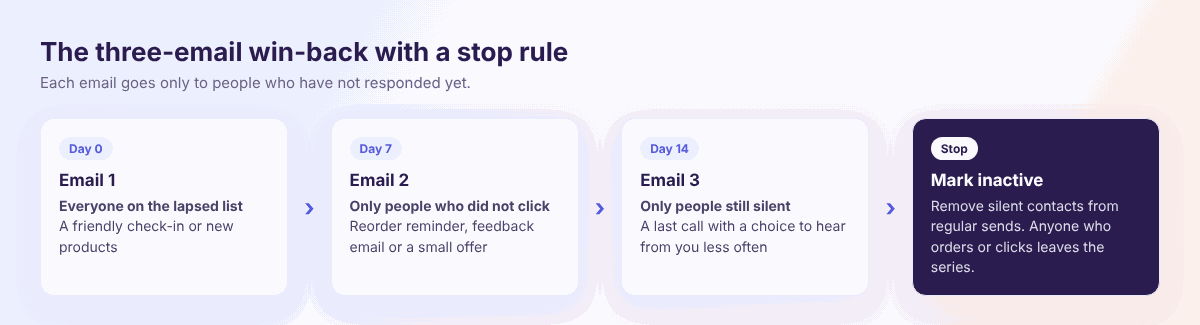
Win-back emails go to customers who passed your cutoff. Three emails is a good balance for most stores, and the days below are editorial starting points.
| Day | Who gets it | What to send |
|---|---|---|
| Day 0 | Everyone on the lapsed list | A friendly check-in or new products |
| Day 7 | Only people who did not click | A reorder reminder, the feedback email or a small offer |
| Day 14 | Only people still silent | A last call with a choice to hear from you less often |
Anyone who orders or clicks leaves the series. If you use an offer, place it in email two, because some customers return without one. Our re-engagement campaign page explains the stages in more detail.
Shoppers who left items in a cart need a different flow, so use abandoned cart recovery for them.
Fix 8: Stop Emailing Contacts Who Never Respond
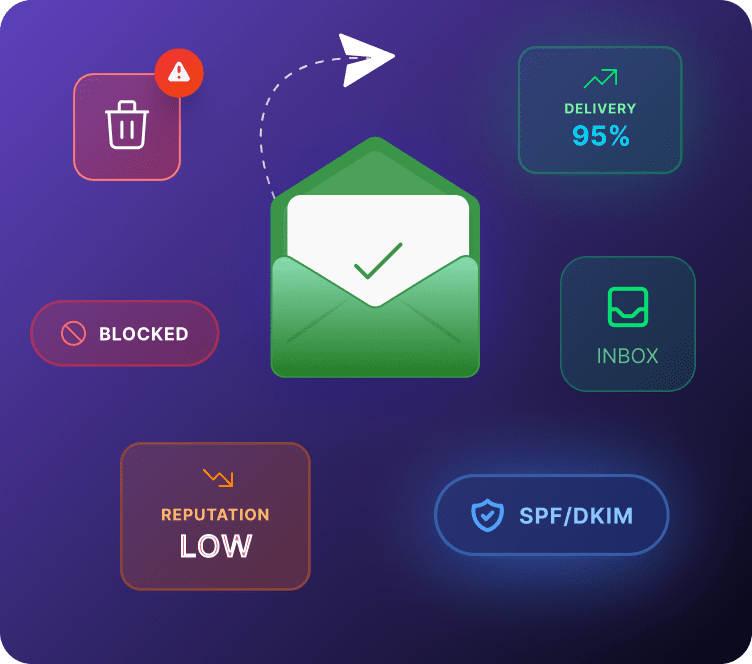
Some customers will not come back, and that is fine. If you keep emailing them, you risk spam reports that can hurt delivery for people who want your emails.
Google’s Gmail sender guidelines suggest unsubscribing recipients who don’t open or read your messages. Apple’s Mail Privacy Protection can show opens that no one made, so define “silent” by clicks and orders instead. Our unengaged segment page shows how.
After your last win-back email, mark silent contacts inactive and remove them from regular sends. Keep three rules in mind:
- Honor opt-outs fast: the FTC’s CAN-SPAM guide allows 10 business days with no fee, but Google’s subscription guidelines ask for 48 hours.
- Watch spam reports: Google asks senders to stay below 0.10% and never reach 0.30%.
- Offer one-click unsubscribe: Gmail requires it for senders of more than 5,000 messages a day.
Good sender habits also protect your inbox placement. Our email deliverability page explains how.
The Full Retention Timeline
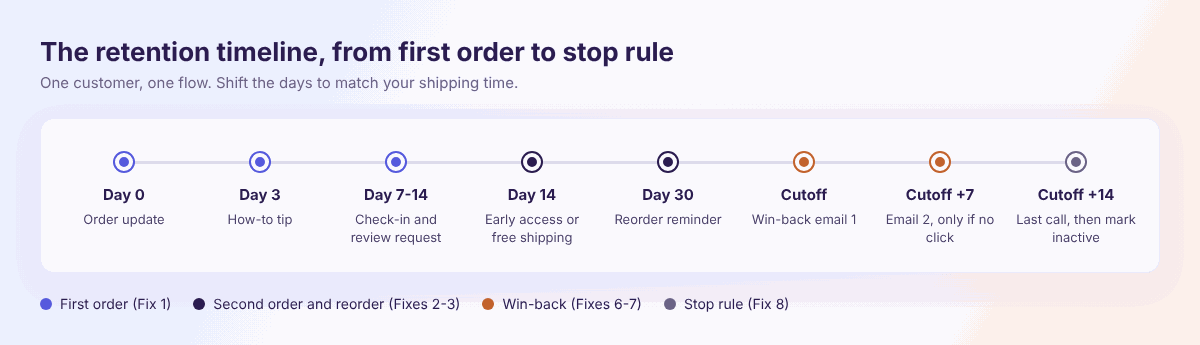
Here is how the fixes fit together for one customer. The day counts run from the order date, so shift them if your shipping is slow. They are editorial starting points.
| When | Message | Fix |
|---|---|---|
| Day 0 | Order update | 1 |
| Day 3 | How-to tip | 1 |
| Day 7 to 14 | Check-in and review request | 1 |
| Day 14 | Early access or free shipping for first-time buyers | 2 |
| Day 30 | Reorder reminder for products that run out | 3 |
| Day 60 (your cutoff) | Win-back email one | 7 |
| Cutoff plus 7 | Email two, only if no click | 6 and 7 |
| Cutoff plus 14 | Last call, then mark inactive | 7 and 8 |
For a Shopify setup plan, see our Shopify email marketing guide, which ends with the win-back flow.
Channels: Email First, Then WhatsApp and Web Push
Start with email, because most stores already have email addresses. Then add one channel at a time, so you can see what each one adds.
WhatsApp marketing suits opted-in customers as a gentle second nudge after an email. Web push notifications reach shoppers who clicked Allow, and the free plan includes 750 web push notifications.
Set Up the Win-Back Flow in Adflipr
Build the flow once and let it run. If you are new to automations, follow the guide to create an automation first, or browse automation workflows for ideas.
- Group lapsed customers. Save buyers past your cutoff as a segment, and keep first-time and repeat buyers apart.
- Pick the starting event. Create an automation, choose the Customer Winback event, and set the date range to your cutoff.
- Add the first email. Build it in the drag and drop email builder with short copy and one button.
- Add a wait and a click check. Put a Delay of 7 days next, then an If / Else condition so only people who did not click get email two.
- Repeat, then end the flow. Do the same at day 14, and finish by changing the contact status to inactive.
How to Tell Whether Churn Is Falling
Check the numbers once a month, and keep the same window each time so you can compare. Track these:
- Repeat purchase rate for each monthly cohort
- Days between the first and second order
- Lapsed customers who came back
- Unsubscribes and spam reports
Compare cohorts by first-order month, so a good January does not hide a weak March. Don’t trust opens alone, because orders and clicks tell the real story. Our analytics and reporting page shows what you can see in Adflipr, and the customer lifetime value page shows how retention adds up over time.
Also test one change at a time, such as the subject line or the timing of email two. Small lists need several weeks of data before a result is clear.
Common Churn Mistakes
- Only chasing new buyers: the second order is cheaper to win.
- One discount for everyone: it cuts margin you did not need to cut.
- Guessing why people leave: ask them instead.
- No stop point: flows keep mailing people who have moved on.
- Stacked flows: two flows on the same day confuse people.
- Ignoring support: slow replies lose customers quietly.
How Adflipr Can Help
Adflipr is an email marketing platform for Shopify and WooCommerce stores. Here is what it covers for churn:
- Contact management: tags, lists and segments for lapsed and first-time buyers
- Automations: win-back, delay, If / Else and status steps in one visual flow
- Email builder: drag and drop emails with merge tags
- Analytics and reporting: results for each campaign and automation
- WhatsApp and web push: extra channels for opted-in customers
Start with one flow and one number to watch. When you are ready, set up your first win-back automation.
Key Takeaways
- Churn in a store shows up as long gaps between orders.
- Set your lapsed cutoff from your own repeat buyers.
- Win the second order, because it makes regulars.
- Match follow-ups to what each customer bought.
- Ask lapsed customers why they stopped, then fix the top reason.
- Send three win-back emails, then stop.
- Remove silent contacts from your regular sends.
Frequently Asked Questions
Use your repeat gap. Take the median days between first and second orders, multiply by 1.5 to 2, and treat anyone past that as lapsed. Then send your win-back series.
Pick a cohort, such as March’s first-time buyers. After your cutoff passes, divide the customers who did not reorder by the cohort size, then multiply by 100.
It depends on what you sell, because gifts and consumables behave very differently. Compare your own cohorts month to month instead of chasing a single number.
Start within days of delivery with a how-to tip. Then offer early access or free shipping about two weeks after the order, before the buyer forgets you.
Three is a good balance for most stores. Send them over about two weeks, only to people who have not clicked, then mark silent contacts inactive.
Sometimes, but they cut margin and teach customers to wait. Try reminders, early access or free shipping first, and keep a discount for the second or third email.
They can, if customers remember them. Email reminders of points and tiers help, but fix delivery and the first order first, because a loyalty program cannot repair a bad experience.
Build one win-back flow and one reorder reminder. Both run on their own after setup, and both reach people who already know your store.
After your last win-back email. Mark them inactive and remove them from regular sends, which protects delivery and keeps spam reports low.