Many WooCommerce store owners pay twice for one job. First, they buy an email marketing tool to build campaigns. Then they add a sending service so those emails reach the inbox. This guide shows why that happens, what it costs, and how to do WooCommerce email marketing without SMTP or a separate sending service, flows included.
Quick answer: WooCommerce email marketing without SMTP is possible. Adflipr builds, sends and tracks your WooCommerce campaigns from one platform, so you skip the separate sending service. You only keep SMTP for WooCommerce order emails.
Does WooCommerce send marketing emails?
Not really. WooCommerce sends transactional emails, such as order confirmations and password resets. It has no built-in tool for newsletters, welcome series or abandoned cart reminders. Therefore, you need a marketing tool for those. For a full definition, see what is transactional email.
| Transactional emails | Marketing emails | |
|---|---|---|
| Examples | Order confirmation, shipping update, password reset | Newsletter, welcome email, abandoned cart reminder, win-back offer |
| Triggered by | A single order or account event | A campaign or a customer behavior |
| Sent by | WooCommerce itself | Your email marketing tool |
| Needs consent | No, they are part of the order | Yes, the shopper must opt in |
This split matters for the rest of the post. In short, the second bill most stores pay is for the marketing side, and that is the one you can remove.
What is SMTP, and does WooCommerce need it?
SMTP is the standard way one mail server hands an email to another. WooCommerce uses your web server’s basic mail by default, so many stores add an SMTP provider. Per WooCommerce, you need one once you send more than about 500 messages a month. Marketing emails that your platform sends do not need it.
Why WooCommerce stores end up paying twice
WooCommerce does not deliver email by itself. According to the WooCommerce documentation, neither WordPress nor WooCommerce sends your email directly. Instead, the message passes through your web server, and that is why many stores add a dedicated SMTP provider.
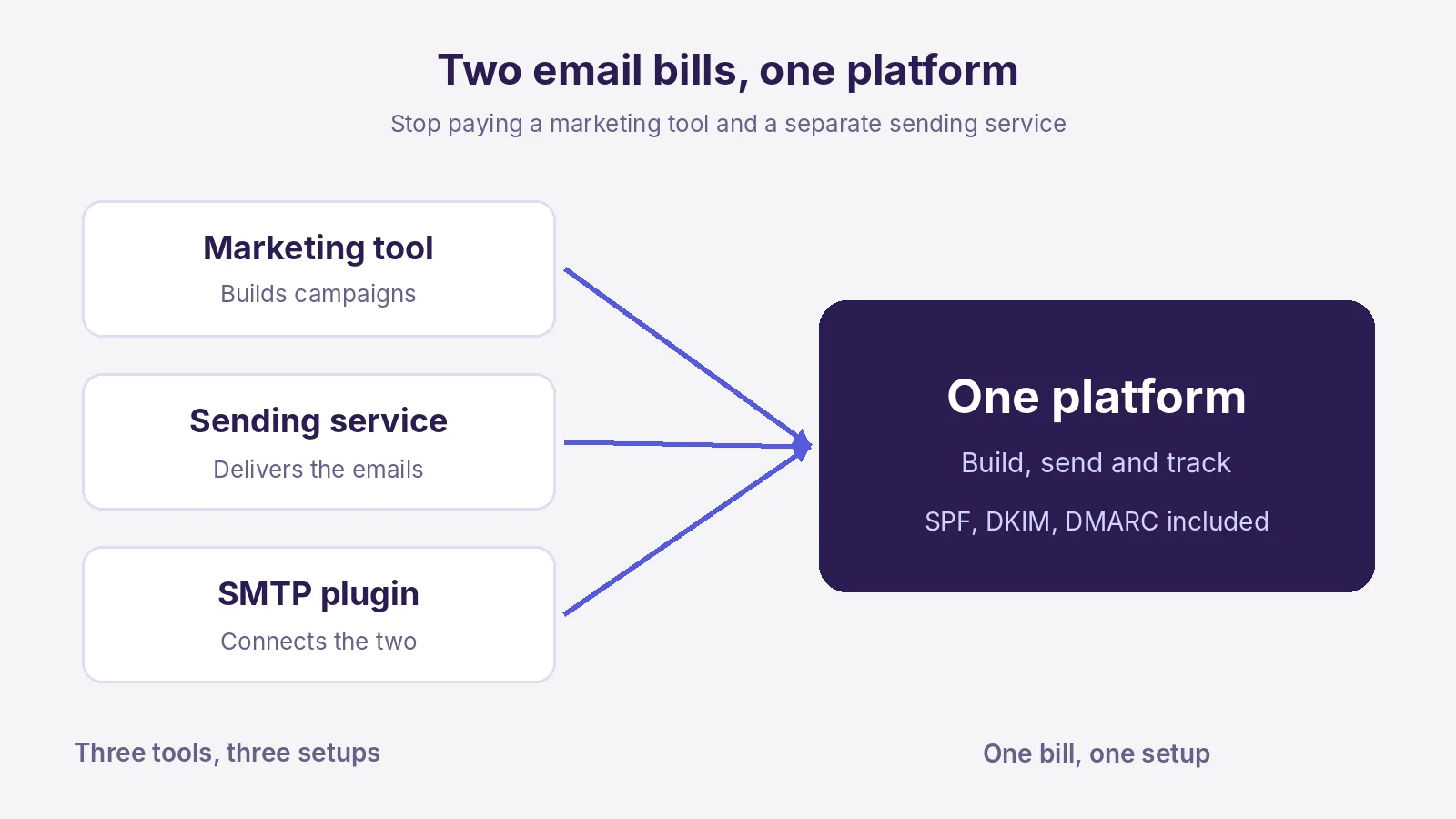
As a result, a typical store ends up with a stack like this:
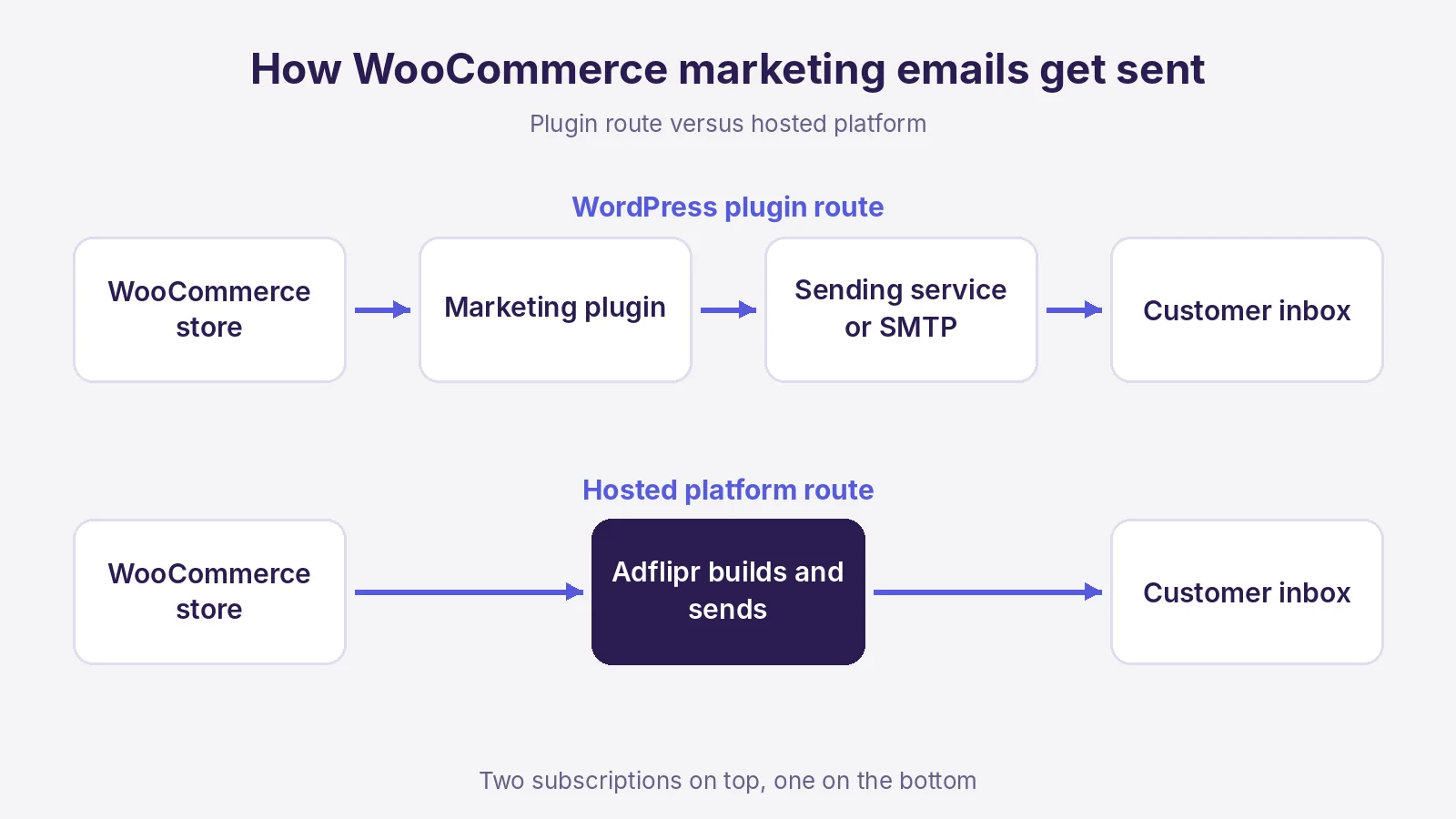
- A marketing plugin or tool, where you build campaigns and automations.
- A sending service, where the emails are actually delivered.
- An SMTP plugin on WordPress, which connects the two.
Each layer made sense when it was added. However, together they mean two bills, two logins and two setups for one result: an email in your customer’s inbox.
The two-bill test
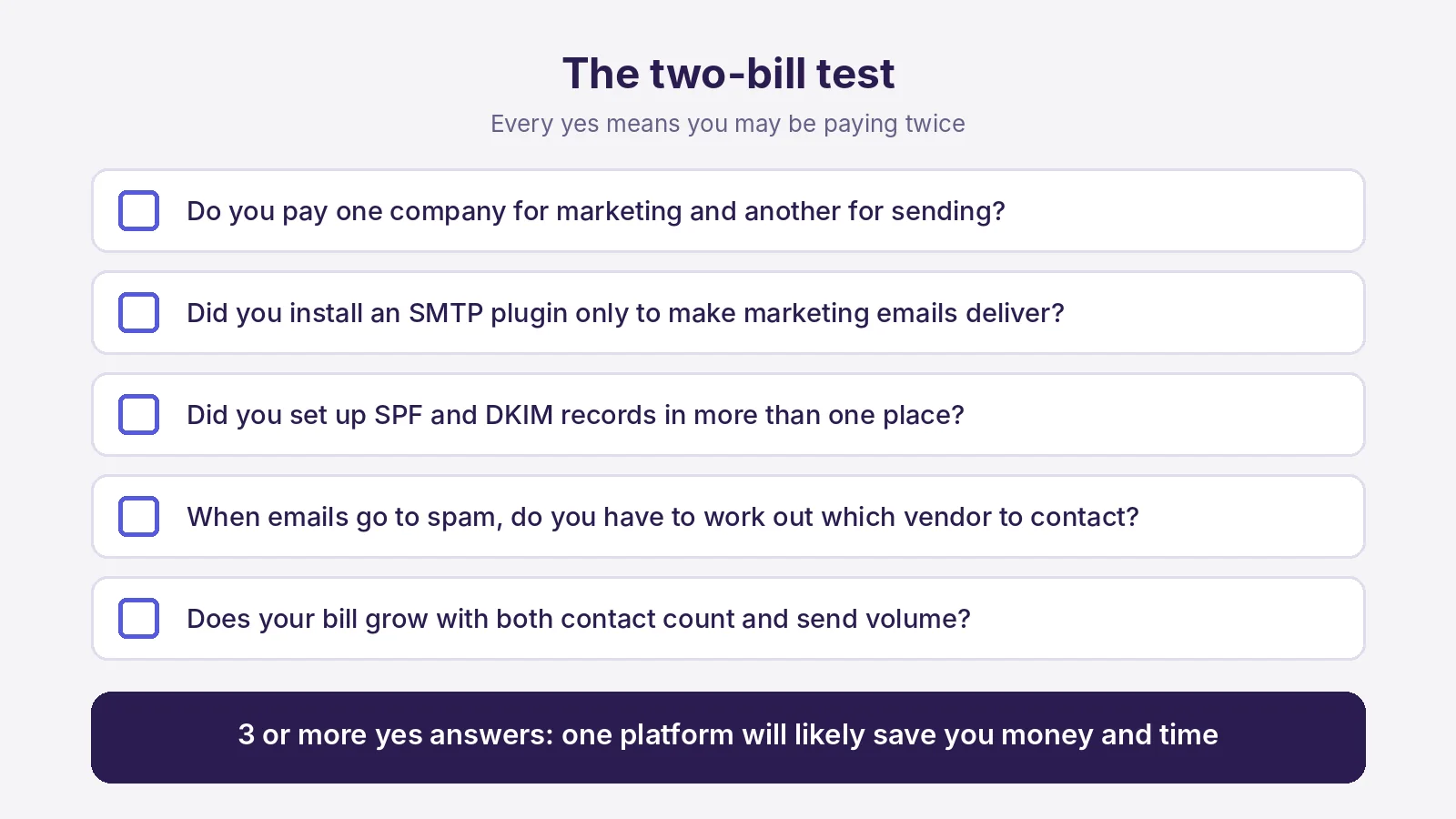
Answer these five questions about your store. Every “yes” is a sign that you pay twice.
- Do you pay one company for your marketing tool and another for sending?
- Did you install an SMTP plugin only to make marketing emails deliver?
- Did you set up SPF and DKIM records in more than one place?
- When emails go to spam, do you have to work out which vendor to contact?
- Does your bill grow with both your contact count and your send volume?
Three or more “yes” answers mean a one-platform setup will likely save you money and time. Fewer than three means your stack is already lean.
How much does a separate SMTP service really cost?
Many stores only count the marketing plan. Instead, add every line item for an honest total:
- The marketing tool or plugin license.
- The sending service or SMTP plan.
- The SMTP or connector plugin license, if you pay for one.
- Extra contacts or sends as your list grows.
The money is only part of it. In practice, the bigger costs show up elsewhere:
- Double setup. You authenticate your domain once for the marketing tool and again for the sending service. Moreover, one wrong DNS record can break both.
- Blame ping-pong. When emails land in spam, each vendor points at the other. Meanwhile, your campaign sits unsent.
- Sync gaps. Orders and customers must flow between tools. Consequently, a failed sync can send a “come back” email to someone who just bought.
Imagine a candle shop in Portland that runs a Friday sale. The campaign is ready, but the sending service rejects the batch because of a DNS mismatch. The owner opens a ticket with the wrong vendor first. By the time it is fixed, the sale is half over.
Use this worksheet with your last invoices:
| Line item | Monthly cost |
|---|---|
| Marketing tool or plugin | Your invoice |
| Sending service or SMTP plan | Your invoice |
| SMTP or connector plugin | Your invoice, monthly share |
| Extra contacts or sends | Your invoice |
| Total | Add the four lines |
Is a WordPress plugin or a hosted platform better for WooCommerce email?
Both approaches work, and each has fair strengths. The real question is where sending happens.
| WordPress plugin | Hosted platform | |
|---|---|---|
| Where your data lives | In your WordPress database | On the platform, synced from your store |
| Sending | Usually needs its own route: your host, an SMTP provider or a sending service | Handled by the platform |
| Site load | Runs on your hosting | Runs off your site |
| Control | More direct control of your data | Less to maintain |
| Typical cost shape | Plugin license plus a sending service | One subscription |
Some plugins and platforms bundle sending, so ask three questions of any option: does it send the emails itself, does it help you authenticate your domain, and does it sync your orders? If you want everything inside WordPress, a plugin is a fair choice. However, if your main goal is to stop paying for two services, a hosted platform that sends for you is simpler.
WooCommerce email marketing without SMTP: what one platform does
An all-in-one email marketing platform handles the campaign and the delivery in one place. With Adflipr, that looks like this:
- Store sync. Connect WooCommerce, and products, orders and coupons come in. See email marketing for WooCommerce for the full list.
- Built-in sending. Adflipr delivers your emails itself, so you do not buy or connect a separate sending service.
- Domain authentication. Adflipr gives you the DNS records to add for your sending domain, so you authenticate it once.
- Ready flows. Welcome, abandoned cart, post-purchase and win-back flows start from store events. Read more about email automations.
- Revenue tracking. You can see which campaign drove each order, instead of judging by opens alone.
- One bill. You can start on a free plan, and paid plans start at $10 a month with unlimited automations. See the pricing page.
| Two-tool stack | One platform (Adflipr) | |
|---|---|---|
| Subscriptions | Marketing tool plus sending service | One |
| Domain setup | Done twice | Done once |
| Store data | Synced between tools | Synced once from WooCommerce |
| When delivery fails | Two support teams | One support team |
| Reporting | Opens in one tool, sales in another | Clicks, orders and revenue together |
Five WooCommerce email flows to run first
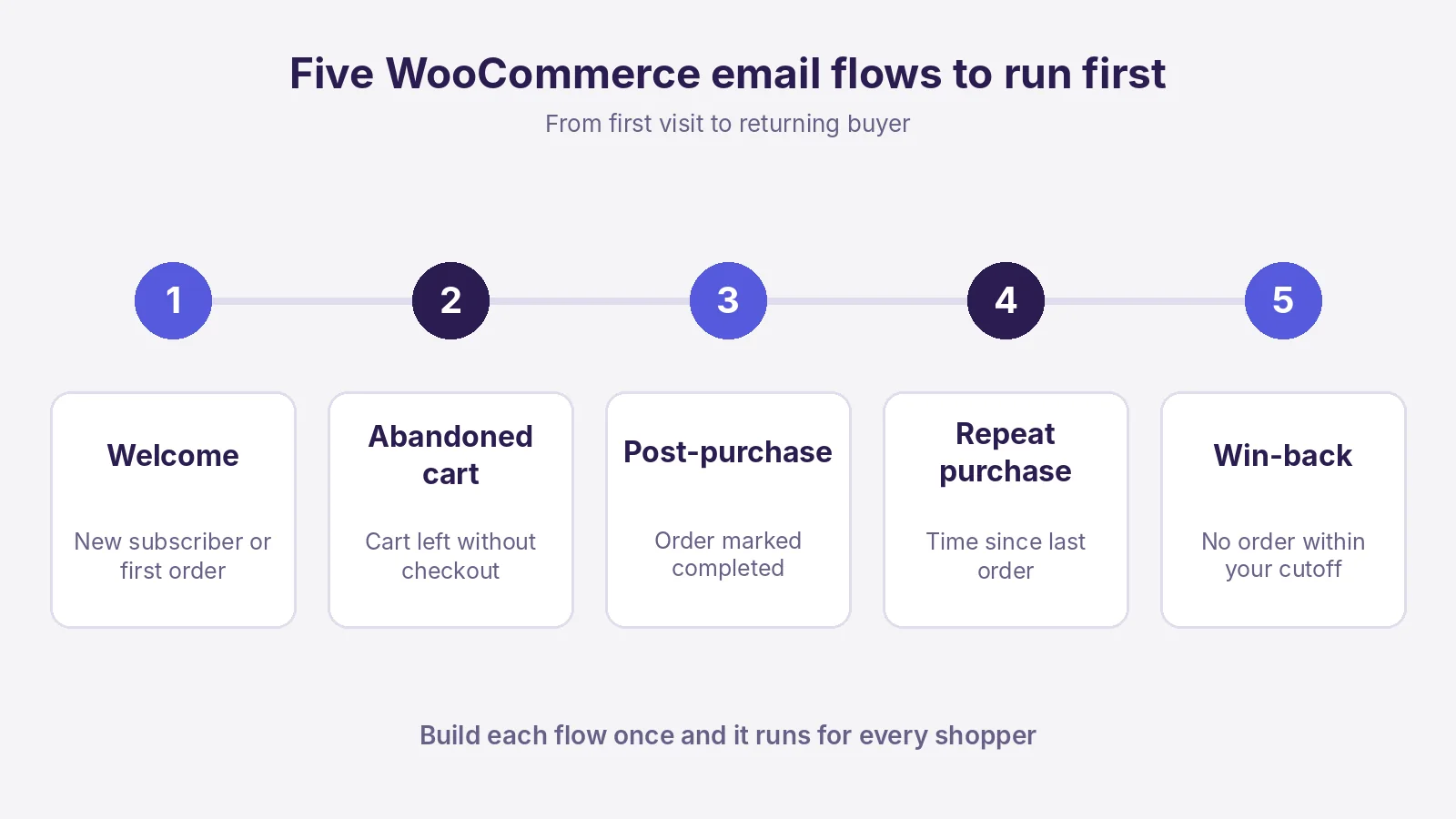
A flow is an automated series that starts from a customer action. You build it once, and it runs for every shopper. Start with these five. The timing is a starting point, so test it on your own audience.
| Flow | WooCommerce trigger | When to send | Goal |
|---|---|---|---|
| Welcome | A new subscriber or first order | Right away, then a second email on day 2 or 3 | Turn a sign-up into a first or second order |
| Abandoned cart | A cart left without checkout | First email within about an hour, a second the next day | Recover the sale |
| Post-purchase | An order marked completed | A few days after delivery | Build trust, ask for a review, suggest add-ons |
| Repeat purchase | Time since the last order | Based on how fast your product runs out | Bring buyers back before they forget you |
| Win-back | No order within your cutoff | Day 0, 7 and 14 | Re-engage lapsed buyers |
Each flow has its own guide, so this post stays short on detail:
- Abandoned cart. Read how to set up WooCommerce abandoned cart emails, or see the abandoned cart recovery page.
- Win-back. The churn guide shows how to set your cutoff and when to stop emailing.
- Birthdays. An optional sixth flow. See birthday email automation.
Keep the follow-up emails short and personal. For example, a post-purchase email can show how to use the product, and a repeat-purchase email can show the same item again.
Segment your list with WooCommerce data
Flows work better when each group gets a message that fits. Your store already holds the data, so use it:
- First-time buyers, who need reassurance and a reason to return.
- Repeat buyers, who respond to early access and loyalty perks.
- High spenders, who deserve a thank-you before a discount.
- Lapsed customers, who belong in the win-back flow.
- Cart abandoners, who need a reminder and not a sale.
Try one rule first. Send repeat buyers a different message from first-time buyers, then compare orders. Small tests like this add up over a year.
How to choose WooCommerce email marketing software
If you are comparing the best email marketing platforms for WooCommerce, check each one against this list:
- Store sync. It should pull in products, orders, coupons and carts from WooCommerce.
- Built-in sending. Ask whether it sends the emails itself or needs a sending service.
- Domain authentication. SPF, DKIM and DMARC should be part of setup.
- Ready automations. The five flows above should be easy to start.
- Segments from order data. Spend, order count and last order date are the useful ones.
- Revenue tracking. You should see orders and revenue per email, not only opens.
- Predictable pricing. Add up contacts, sends and add-ons before you commit.
- A free plan or trial. Test it on a small segment before you move your list.
Adflipr is built around this list, and you can check it for yourself on the free plan, or on the $10 plan if you want automations.
What about WooCommerce order emails?
Order receipts and shipping notices are different. These are transactional emails, and WooCommerce generates them itself. Therefore, they are not part of this switch.
Many stores keep a basic SMTP connection just for these receipts. That is fine, because it handles a few messages per order and not your marketing volume. The savings come from removing the sending service you pay for campaigns.
How to move to one platform in five steps
You can switch without pausing your sends. Follow this order so nothing breaks.
- Connect your WooCommerce store. Products, orders and coupons sync in.
- Authenticate your sending domain. Add the DNS records Adflipr gives you, and publish a DMARC record for your domain.
- Bring your contacts across. Export your list from your current tool, import it, and keep only people who agreed to receive email.
- Rebuild your top flows. Start with a welcome email and an abandoned cart email. The email builder has templates for both.
- Test, then cancel. Send a small campaign first. After it lands well, cancel the old tools.
If you need a refresher on the first send, read how to create an email campaign.
Why WooCommerce emails go to spam, and how to avoid it
Many stores search for WooCommerce emails going to spam after a campaign flops. The causes are usually simple:
- The sending domain has no SPF, DKIM or DMARC record.
- The From address does not match the authenticated domain.
- The list contains old or invalid addresses, so complaints and bounces rise.
Moving platforms is also the riskiest moment for inbox placement. So, before you cancel anything:
- Authenticate your domain with SPF, DKIM and DMARC.
- Keep spam complaints below 0.3%, the limit Google sets for bulk senders, which means about 5,000 or more messages a day to Gmail.
- Add a one-click unsubscribe link to every marketing email.
- Warm up gradually. Send to your most engaged contacts first, then widen the list.
Consent matters just as much as authentication. A purchase alone is not permission to send marketing email, so add an opt-in checkbox at checkout. If you sell to the EU or UK, collect a clear opt-in under GDPR. If you sell in the US, include an unsubscribe link and your business address in every marketing email.
For the official rules, read the Google sender guidelines and the Yahoo sender best practices. In addition, the email deliverability page explains how Adflipr helps.
When two tools still make sense
One platform is not right for everyone. To be fair, a separate sending service can be the better choice in a few cases:
- You have a developer team that runs custom email infrastructure.
- You send very large volumes and need dedicated IP control.
- You rely on a sending setup that your other systems also use.
For most small and mid-size WooCommerce stores, however, none of these apply. In that case, the second subscription adds cost and risk without adding results.
How Adflipr can help
Adflipr is an email marketing platform for Shopify and WooCommerce stores. For WooCommerce, it gives you:
- Store sync for products, orders and coupons.
- A drag-and-drop email builder with ready templates.
- Automations for welcome, abandoned cart, post-purchase and win-back emails.
- Built-in sending with guided domain setup.
- Order-level revenue reporting for every campaign.
Start on the free plan, and run your first campaign before you cancel anything. For the full strategy, read our email marketing for WooCommerce guide. Do you also run a Shopify store? The same platform works there too, so see email marketing for Shopify.
Key takeaways
- WooCommerce sends order emails, not marketing emails, and it does not deliver email by itself.
- A marketing tool plus a sending service means two bills and two setups.
- The two-bill test shows in five questions whether you pay twice.
- A hosted platform that sends for you removes the second subscription.
- Five flows, welcome, abandoned cart, post-purchase, repeat purchase and win-back, cover most of the revenue.
- Switch in steps, test with a small send, then cancel the old tools.
Frequently Asked Questions
Not for marketing emails if your platform sends them itself. SMTP mainly matters for WooCommerce’s own order emails. A platform like Adflipr delivers campaigns and automations without a separate sending service.
No. WooCommerce sends transactional emails, such as order confirmations. For newsletters, welcome series and abandoned cart reminders, you need an email marketing tool connected to your store.
Start with a welcome email, an abandoned cart reminder, a post-purchase follow-up, a repeat-purchase reminder and a win-back series. Together they cover the customer journey from first visit to returning buyer.
Connect your store to an email platform, then build a flow triggered by a completed order. Add a short delay, a helpful message and a review request. The flow then runs for every buyer.
Send the first reminder within about an hour, while the cart is still fresh. Follow with a second email the next day. Test both delays on your own shoppers.
Common causes are missing SPF, DKIM or DMARC records, a From address that does not match your domain, and a list full of old addresses. Authenticating your domain fixes the first two.
Yes. Adflipr has a free plan, so you can connect your store and send a first campaign before you pay. Check the pricing page for what each plan includes.
A plugin runs inside WordPress and usually needs its own sending route. A hosted platform runs outside your site and sends the emails for you, so there is one subscription.
They stay with WooCommerce. Order receipts and shipping notices are transactional emails the store generates, so you can keep a basic SMTP connection for them while marketing moves to Adflipr.
It can if you switch carelessly. Authenticate your domain first, send to engaged contacts, and widen gradually. Keep the old tool until your first campaigns deliver well.