
The workflow feature in Adflipr helps you automate how you talk to your contacts.
Instead of sending messages one by one, you can create a journey where Adflipr automatically sends emails, messages, or actions based on what the user does.
This feature works smarter to make journey more easy:
- Adflipr reacts automatically
- The user moves to the next step
This saves time and makes your marketing consistent and professional.
Starting the Journey with workflow
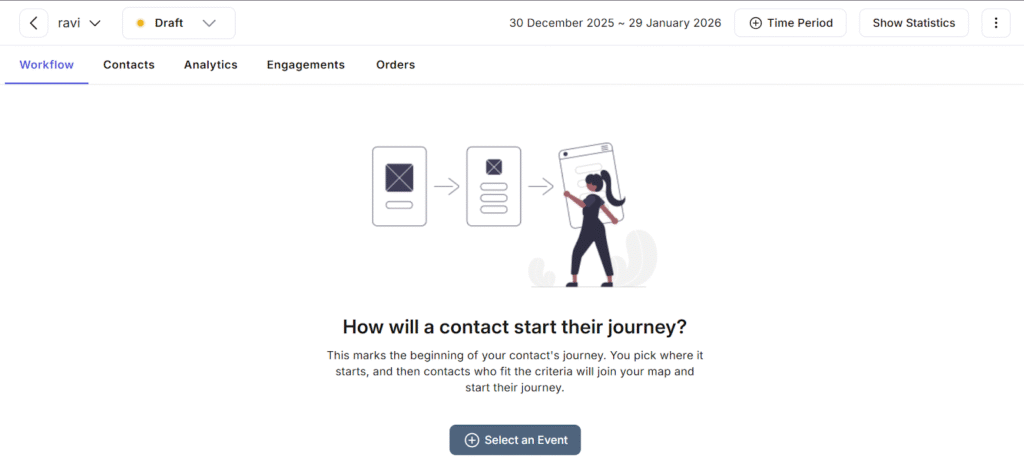
Every workflow starts with a trigger event. In simple words you choose what action starts the journey.
For example:
- Someone signs up
- Someone clicks a link
- Someone makes an order
When that event happens, the contact automatically enters the workflow.
“How will a contact start their journey?”
You select an event, and that’s the starting point.
Automatic Actions
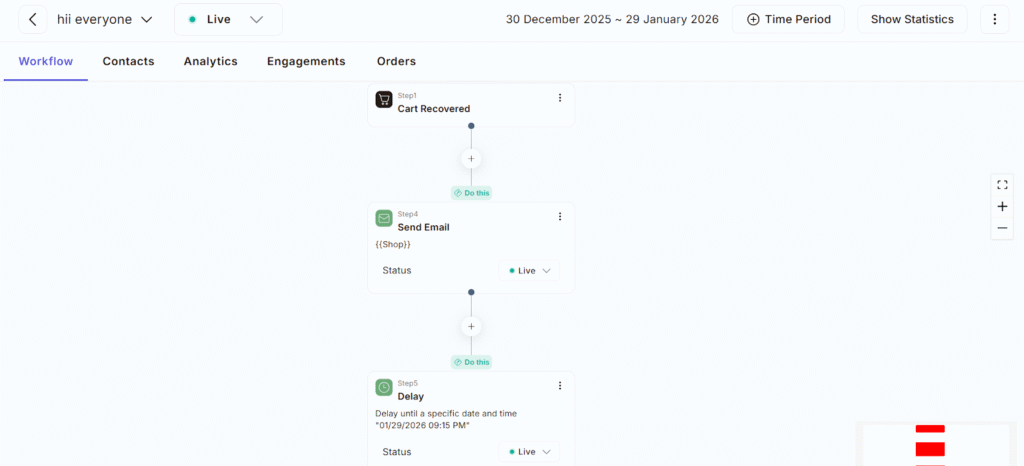
Once the contact enters the workflow, Adflipr can perform actions automatically, such as:
- Sending emails or messages
- Showing specific content
- Moving the contact to another step
- Tagging or updating contact details
Step-by-Step Journey
The workflow is designed like a step-by-step path.
Each contact:
- Starts at the beginning
- Moves forward based on rules you set
- Gets the right message or action at the right time
Even if you have 100 or 10,000 contacts, everyone gets the same smooth experience.
Smart Filtering
Only contacts that match your criteria will join the workflow.
For example:
- Only new users
- Only people who bought a product
- Only users from a specific campaign
This keeps your automation targeted and effective
Workflow Automation is Useful in many ways such as:
- Saves time by automating repetitive tasks
- Works 24/7 without manual effort
- Improves customer engagement
- Helps you manage contacts smartly
Workflow Automation in Adflipr is like setting up a digital assistant that:
- Watch what your contacts do
- Starts their journey automatically
- Sends the right messages
- Moves them step by step