
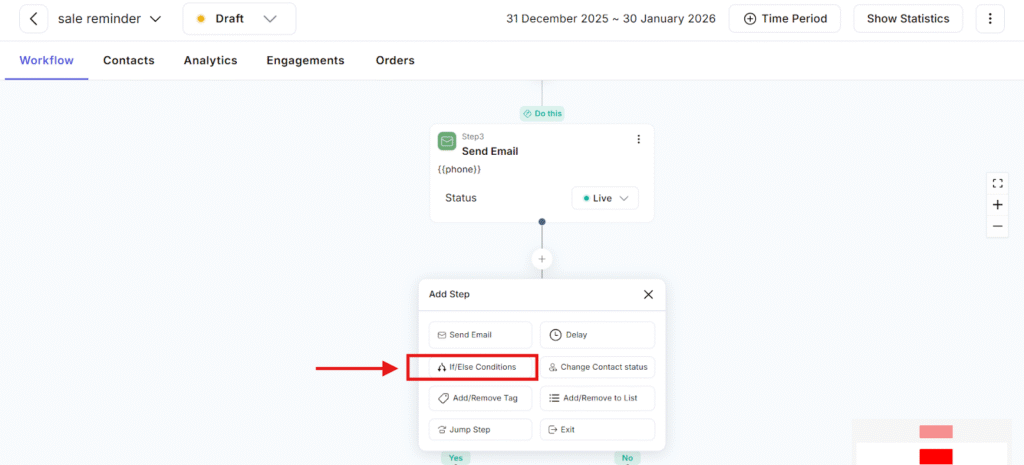
The If / Else Conditions feature allows you to split your workflow into different paths based on a contact’s data, behavior, or status.
In simple words:
– Adflipr checks a condition
– If the condition is true → one path is followed
– If the condition is false → another path is followed
This feature is used inside workflows. You can add if / else condition in your workflow
Using If / Else Conditions, Adflipr can check things like:
- Does the contact have a specific tag?
- Is the contact in a specific list?
- Has the contact opened an email?
- Has the contact clicked a link?
- Contact status (Active, Inactive, Blocked, etc.)
Step-by-step flow:
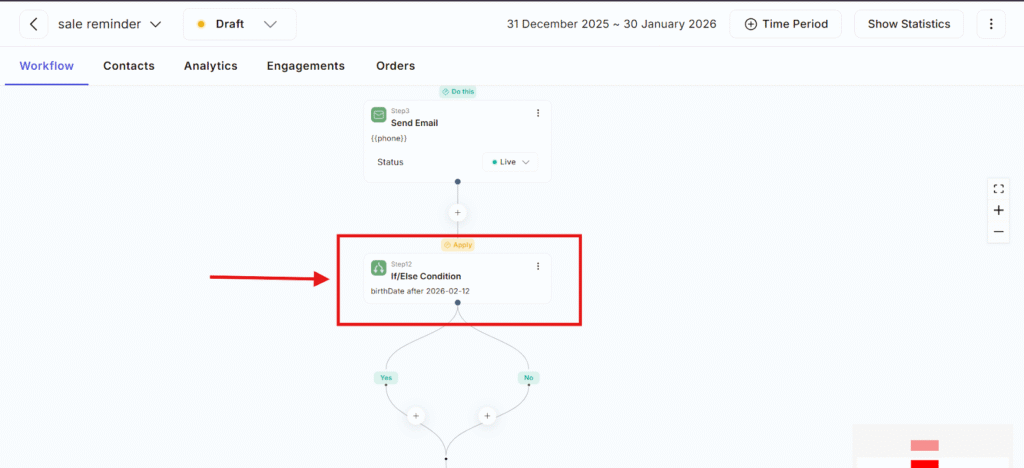
- Contact reaches the If / Else Condition step
- Adflipr checks the rule you set
Example: Has the contact opened the email? - Based on the answer:
- YES path → Condition is true
- NO path → Condition is false
- Each path can have different actions
This feature is important
– Personalized communication: Users receive messages based on what they do, not random blasts.
– Higher conversions: Interested users move faster toward purchase, while inactive users get reminders.
– Smarter automation: Once set, Adflipr handles everything automatically no manual tracking is needed.
– Saves time & effort: No need to create multiple workflows for different users.
If / else condition can be used for example-
Sale
- If user clicks “Buy Now” send payment link
- Else send discount reminder
Email Engagement
- If email opened send next email
- Else resend with a different subject
If / Else Conditions is like a smart decision-maker inside Adflipr that helps you send the right message to the right person at the right time, based on what they do or who they are.